


Product Comparisons
enPowerManager: Remote PC power management software
Save energy, lower costs, and simplify PC power management. Automate PC power policies across your entire organization on-site and remote to save thousands in energy bills, simplify IT, and meet sustainability goals.
*No credit card required · 14-day free trial · For on-prem pricing, contact Sales
700+ organizations trust CurrentWare's employee monitoring software for visibility & control

Unmanaged PCs are costing your organization thousands in wasted energy and countless IT hours.
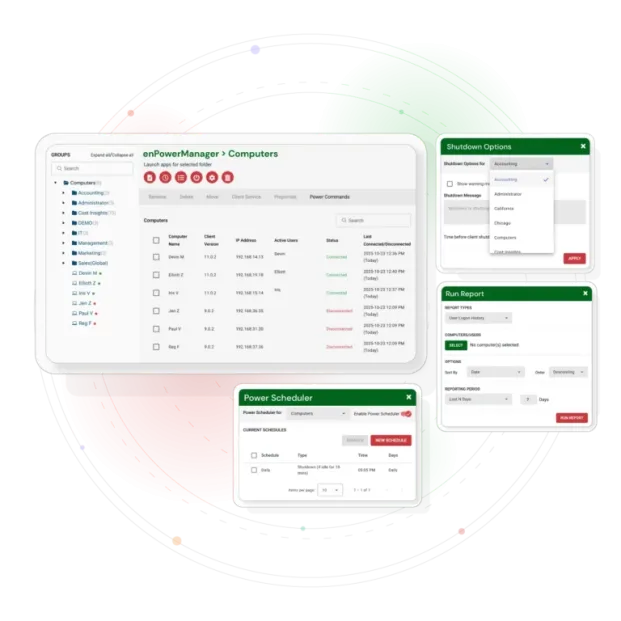
enPowerManager automates PC power management from a centralized web console. Our software gives you complete control, so you can stop chasing down manual shutdowns and start saving energy instantly.
Control PC Power States
Centrally manage and automate PC power states across an entire network of computers, allowing administrators to configure power settings for all devices. Administrators can remotely schedule shutdowns, restarts, standby, or hibernation are powered down to conserve energy and reduce costs.
Schedule PC Power States
enPowerManager offers precise power scheduling capabilities, enabling IT administrators to set automated start-up, shutdown, restart, standby, and hibernate routines for networked PCs. These schedules help cut energy waste, maintain compliance, and extend hardware lifespan by ensuring devices only run when necessary.
Track User Logins
Gain visibility into user activity with detailed login and logout reports. enPowerManager records each user’s session times, making it easy to monitor attendance, verify active usage, and strengthen security policies. This insight helps administrators identify irregular login patterns, ensure compliance, and optimize workforce productivity.
Advanced PC Power Policies
enPowerManager’s advanced PC power policies give administrators fine-grained control over how computers manage energy. These policies can automatically turn off monitors and hard disks after periods of inactivity, enforce hibernation or standby, and force password entry on wakeup for security; these advanced policies can be enabled or disabled as needed for different user groups.
Why Remote PC Power Management Matters
Unmanaged computers waste thousands of dollars in energy each year, making effective power management software essential for modern organizations.
Manual shutdowns are unreliable, and IT teams struggle to enforce consistent power policies across a distributed workforce, whereas centralized management improves response to power issues.
With centralized PC power management, you can reduce IT costs, improve visibility, and support sustainability goals, all while ensuring business continuity, so IT teams can focus on strategic initiatives rather than manual power management tasks.
enPowerManager : Built for Efficiency, Control, and Savings
Cut IT Energy Costs
Automatically shut down idle computers to eliminate wasted energy and see a rapid ROI.
Simplify IT Operations
Manage all your endpoints from one centralized web console with minimal effort.
Boost Security & Compliance
Track device logon/logoff activity for audit trails and better security.
Support Sustainability
Easily reduce your carbon footprint and achieve ESG goals by optimizing laptop performance
Power State Control
- Remotely restart, shutdown, hibernate, or standby Devices, with support for automated OS shutdown procedures. Devices can also be managed locally via a secure connection for enhanced control.
- Use delayed shutdown to prevent data loss or work interruption.
Scheduling & Automation
- Power Scheduler: Automatically trigger startup/shutdown events, including actions in response to power events. Supports event logging for audit and troubleshooting purposes. Scheduling can be managed across multiple subnets for distributed environments.
- Wake-on-LAN: Boot up PCs remotely at the beginning of the workday.
- Idle Shutdown: Save energy by turning off machines not in use.
Audit & Tracking
- Startup/Shutdown Tracking: See when devices are powered on/off, and track changes to configuration files for compliance.
- Logon/Logoff Auditing: Monitor user activity for accountability.
Enterprise-Ready Management
- Centralized web console with Active Directory integration, supporting integration with IT services for streamlined management.
- Scales for SMBs and enterprises with SQL Server support.
- Role-based access control and two-factor authentication.
Security & Offsite Management
- Apply power management policies to remote devices, with enPowerManager enabling remote management for secure access and control from anywhere in the world.
- Protect the management console with enterprise-grade security.
enPowerManager
Compare enPowerManager with Other Endpoint Management Tools
enPowerManager handles remote shutdown, power schedules and logon and logoff tracking. If you are weighing a wider endpoint platform, start with these comparisons.
- Product Comparisons
Zscaler Alternative
- Product Comparisons
WebTitan Alternatives
- Product Comparisons
Veriato Alternatives
- Product Comparisons
Teramind Alternatives
- Product Comparisons
SafeConsole Alternative
- Product Comparisons
ManageEngine Alternative
- Product Comparisons
InterGuard Alternative

See What Our Customers Have to Say
enPowerManger’s Key Features
Start, Restart & Shutdown
Remotely control the power state of your computers
Wake on LAN
Automatically boot up computers at the beginning of a work day
Track Startup/Shutdown
Track when your users startup and shutdown their computers
Audit Logon Events
Track when your users logon or logoff their computers
Power Scheduler
Automatically trigger computer power states on a set schedule and turn off idle computers
Advanced Policies
Control power status of laptops when when they are plugged in vs. running on batteries
Add energy savings to the full business case
Powering down 175 devices outside working hours avoids roughly 39,900 kWh a year. See what that is worth in your currency, beside licence and productivity savings.
Who Trusts enPowerManager ?
IT Administrators
Automate endpoint power policies and save time.
Finance Teams
Reduce energy bills and improve ROI.
Sustainability Officers
Achieve ESG goals by cutting wasted power.
Organizations with Remote Staff
Enforce power-saving policies on laptops outside the office.
Solutions That Work Across Industries
Tailored controls that help you meet industry standards, boost efficiency, and protect sensitive data across remote and in-office teams.
Healthcare
HIPAA-ready controls to protect PHI with USB management and insider-threat visibility.
Government
Cybersecurity and policy enforcement aligned to NIST 800-171 and CMMC.
Legal Services
Keep client data protected, billable hours productive, and software costs in check.
Manufacturing
Productivity monitoring and internet visibility for both the shop floor and back office.
Financial Services
Enforce access policies and protect sensitive financial data with audit-ready trails.
Schools & Libraries
CIPA-compliant web filtering to qualify for E-Rate and keep students safe online.
Small Business Employee Productivity
Track unproductive web browsing and idle time to detect time-wasting
Managed Service Providers
Deliver the monitoring, data-loss prevention, and web filtering your clients need, now with faster deployment, and easier management.
Built to Support Your Compliance Program
Discover how organizations use CurrentWare’s employee monitoring software to improve visibility, strengthen compliance efforts, and manage employee activity more effectively.
- CMMC Compliance →

CMMC
Endpoint Restriction to Protect CUI & FCI
- NIST 800-171 Compliance →

NIST 800-171/53
Protect Controlled Unclassified Information
- ISO 27001 Compliance →

ISO 27001
Increase the Maturity of Your ISO27K ISMS
- HIPAA Compliance →

HIPAA
HIPAA protects sensitive patient data
- Cyber Essentials Compliance →

Cyber Essentials
Critical Security Controls For Your Assessment
- GDPR Compliance →

GDPR
EU’s data protection and privacy law
- NERC CIP Compliance →

NERC CIP
Protect TCAs & BCSI From Insider Threats
- CIPA Compliance for Education →

CIPA for Education
Qualify for the FCC’s E-Rate Program
Pick & Plug Into Your Existing Stack
CurrentWare works alongside the identity, security, and directory tools you already use, including support for SAML, OIDC, and CEF standards. Cloud connectors are on the way.
- Tested & supported
- Generic standards (SAML, OIDC, CEF)
- On the roadmap (Cloud)


Keep reading
Articles
- Workforce Productivity
10 Signs of Overworked Employees
Overwork is one of the most costly problems in the modern workplace and one of the easiest to ignore. The…
- Workforce Productivity
Workforce Activity and Application Usage Reports
Successful executive leadership goes beyond monitoring employees' every move; it also needs a clear, factual picture of digital workflows, which…
- Employee Monitoring
Best Workforce Analytics Software
Workforce analytics software collects data on how work gets done, such as active time, app and website use and workload…
- Employee Monitoring
What Is Goldbricking
Companies are heavily reliant on the quality and volume of work that their employees produce. From that reliance comes a…
- Employee Monitoring
Replacing Time Logs with Productivity Visibility
On paper, your professional services team appears to be running smoothly — billable hours are logged, tasks are checked off,…
- Employee Management
Tips for Preventing Employee Burnout and Increase Productivity
Employee burnout has officially been recognized by the World Health Organization (WHO) and has become the responsibility of employers. The…

Ready to Cut Your IT Energy Bills?
Try enPowerManager risk-free and see how much your organization can save.
No Credit Card Required
All subscriptions include ongoing updates and direct support from our team.