

G2 Capterra 4.85 | +1K reviews
AccessPatrol – USB Device Control & Data Loss Prevention
Data Loss Prevention Software That Actually Works
Protect sensitive files, prove compliance, and keep your workforce productive.
Stop Data Theft: Block unauthorized USB devices, cloud storage & removable media
Monitor User Activity: Track file transfers, web browsing & app usage in real-time
Meet Compliance Requirements: Address CMMC, GDPR, HIPAA & ISO 27001 gaps
of consumers believe businesses aren't doing enough to secure their data
of employees have brought data from a previous employer to a new one
Stop Data Loss Before It Starts
Detect, control, and prevent insider threats with advanced USB device restrictions and DLP software policies
Trusted by local and state government agencies , healthcare organizations, professional services firms, and more.









The Hidden Threat
Block Rogue Devices Before They Cause Damage
Unmanaged USBs and peripherals are one of the easiest ways for data to walk out the door. AccessPatrol makes control effortless and precise
Block Unauthorized Devices
Stop data leaks, insider theft, and malware infections by blocking USB flash drives, external HDDs, smartphones, tablets, cameras, printers, Bluetooth adapters, Wi-Fi dongles, and more.
Granular Permissions That Keep Work Moving
Apply Full Access, Read-Only, or No Access by device type. Restrict at the user, group, or endpoint level.
Approve Only Trusted Devices
Whitelist company-issued devices using Vendor ID, Product ID, and Serial Number. Personal drives stay locked out.
Protect Against Rogue Connections
Contractors, guests, or careless employees introducing unmanaged devices are instantly stopped before they put data at risk.
Key Features
Key Features of Our DLP Solution
Comprehensive endpoint protection with powerful monitoring, control, and reporting capabilities.
Restrict Access to Every Data Egress Point
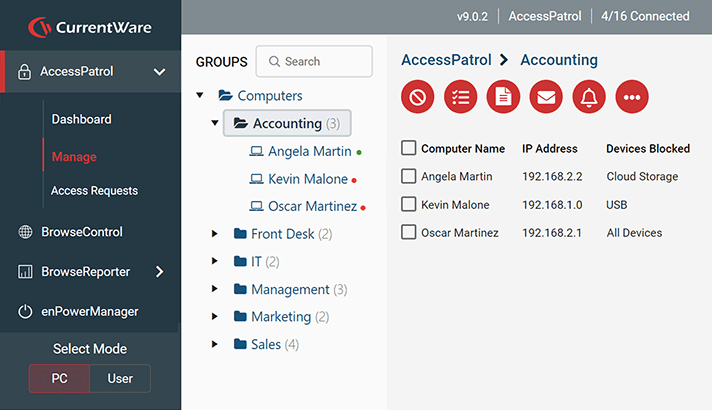
CurrentWare gives administrators simple, centralized control to block or limit access to USB drives, external hard drives, SD cards, and more. Permissions can be set to full access, read-only, or no access, and authorized devices are easily whitelisted.
• Block unauthorized USB drives, external HDDs, SD cards
• Restrict access to cloud storage apps and services
• Set Full Access, Read-Only, or No Access per device
• All device activity and file transfers logged for auditing
Detect, Prevent, and Investigate Insider Threats
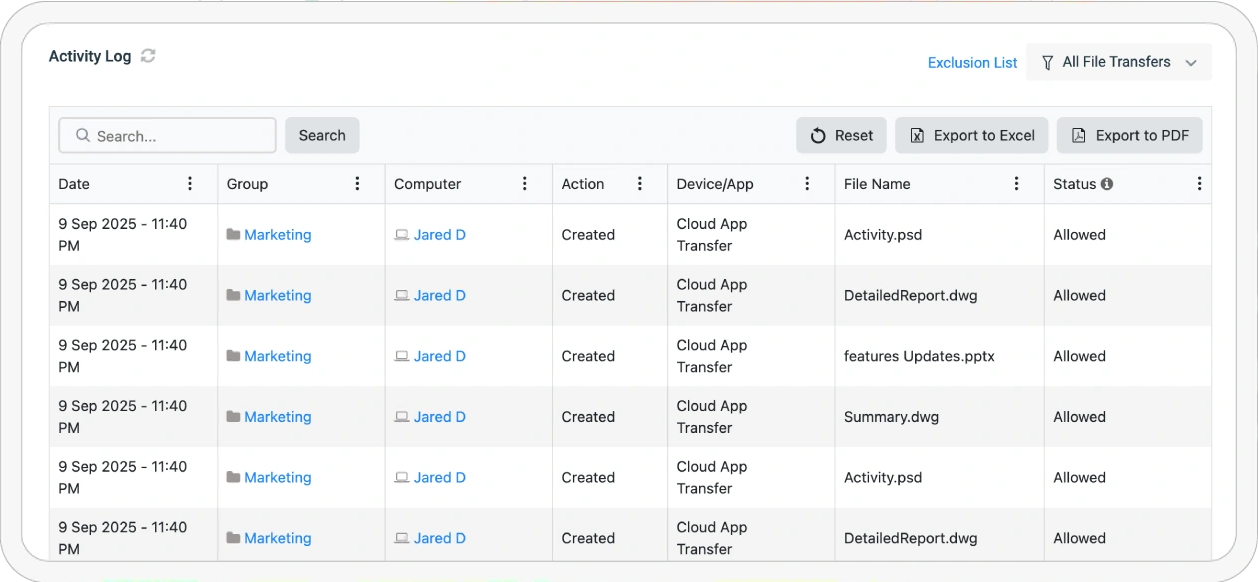
CurrentWare captures detailed logs of file transfers, USB and cloud usage, application and web activity, login/logout times, and periodic desktop screenshots. Real-time alerts help administrators quickly spot policy violations.
• Track file transfers, web browsing, and app usage
• Automatic screenshots and remote desktop viewing
• User behavior analytics to identify anomalous activity
• Real-time alerts for policy violations and risky behavior
Go Beyond Device Blocking. Control File Movement.
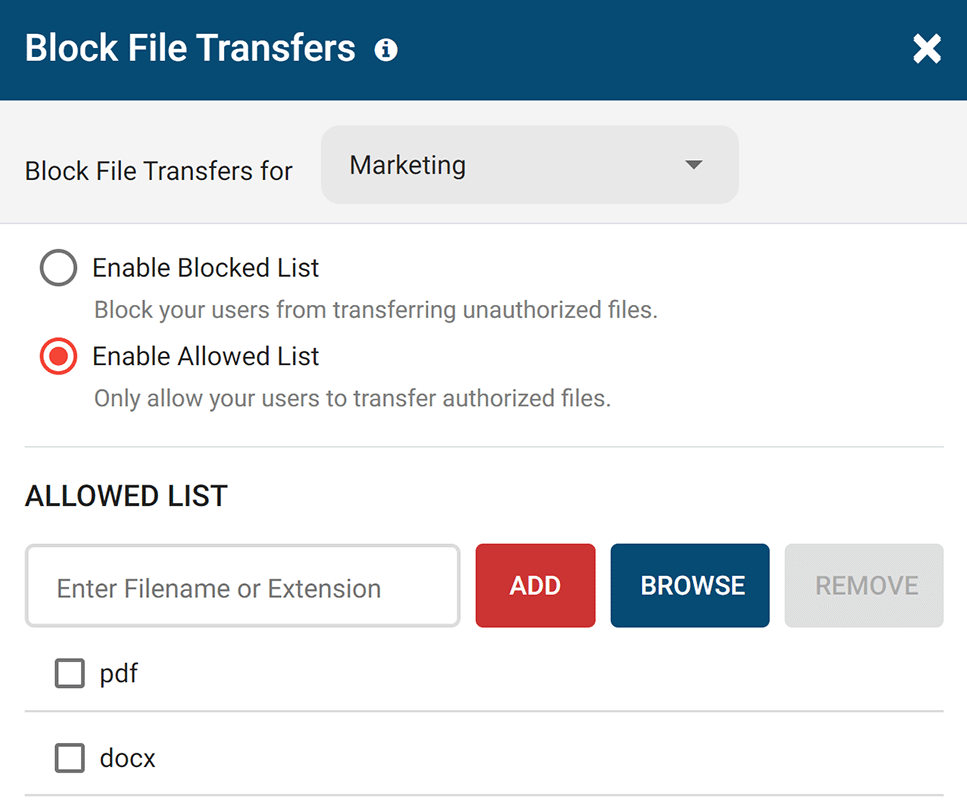
Block file transfers to portable storage devices based on file extension and file name. Use the File Filter to prevent the uploading and downloading of specific files such as EXEs. Signature-based scanning detects renamed or masked files.
Address Critical Cybersecurity Gaps
CurrentWare provides essential security controls to help organizations meet compliance requirements, support compliance audits, and prevent violations. Enable secure tracking, detailed audit trails, and strict access controls.
Compliance Automation
Prove Compliance With Every File Transfer
Audits shouldn’t be a fire drill. AccessPatrol makes compliance automatic.
Control What Leaves Your Network
Block file transfers by extension (.pdf, .docx, .xls, etc.). Signature-based scanning detects renamed or masked files.
Know What Happens, When It Happens
Monitor and log every copy, rename, and delete event with timestamp, user, device ID, and action.
Get Alerts Before Issues
Escalate
Receive real-time email notifications for blocked usage or suspicious file activity.
Stay Flexible Without Losing Control
Department-Level Policies
Let engineering teams use USB tools while locking down finance or HR. No more “all-or-nothing” access.
Grant Temporary Access Safely
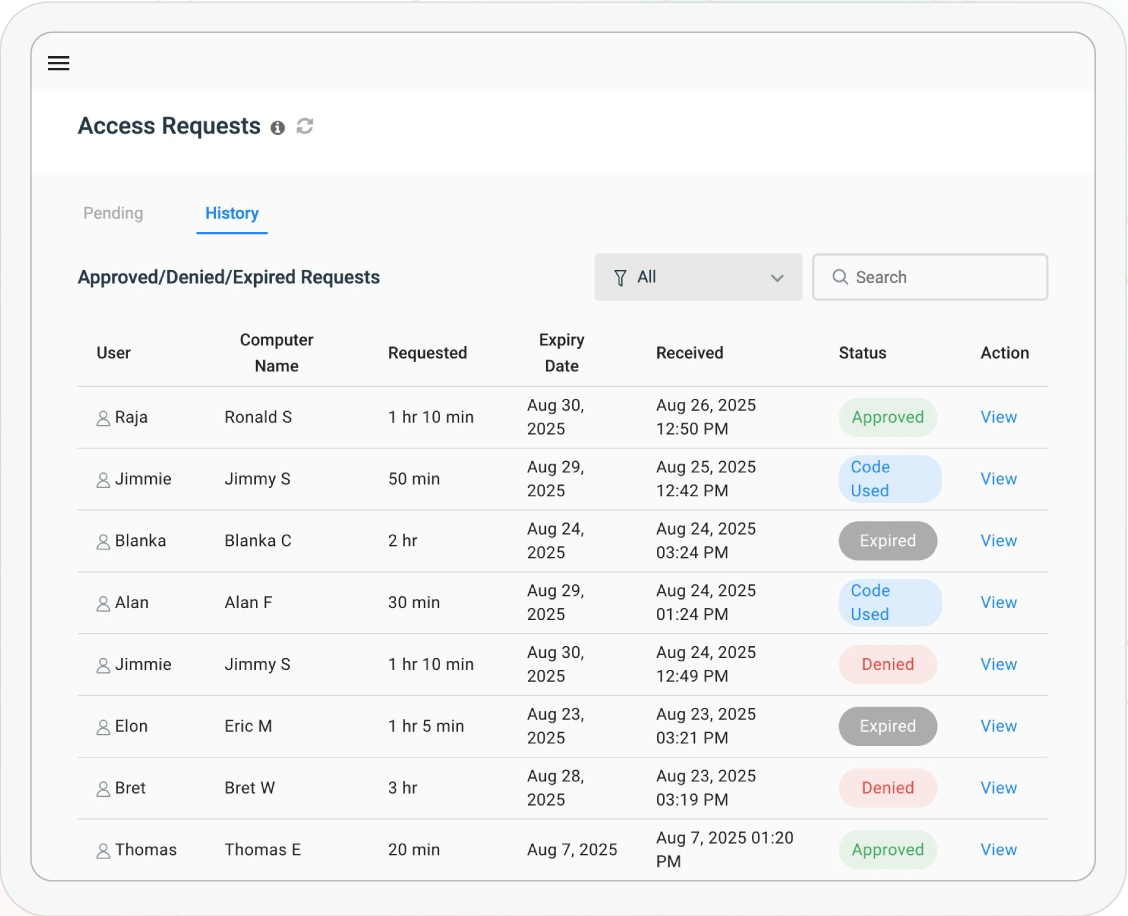
Generate single-use access codes with expiry times for vendors, auditors, or employees. Works even offline.
BYOD and Remote Scenarios
Allow trusted devices for contractors or remote teams without weakening company-wide policies.
Enforce Security Everywhere : Onsite or Remote
Whether you manage 50 endpoints or 5,000, AccessPatrol enforces policies consistently across hybrid, remote, and on-premises environments.
Centralized Web Console
Manage every endpoint from a single dashboard.
Active Directory Integration
Automatically enforce policies by OU or security group.
Transparent & Stealth Modes
Run silently in the background or provide notice of monitoring.
Always-On Protection
Policies remain active even when devices are offline or offsite.
Enterprise-Ready Architecture
Built for scale with SQL Server support, 2FA, and role-based access control.
Fast Deployment
Deploy in minutes across remote, hybrid, or on-premises workforces.
What Happens When a Threat Strikes?
An employee attempts to copy sensitive files onto a USB drive. Here’s how AccessPatrol responds – instantly
An employee attempts to copy:
-
Customer records
-
Financial reports
-
Proprietary designs
AccessPatrol automatically:
-
Blocks the device
-
Logs the attempt
-
Alerts IT
-
Records the incident for compliance
What Our Customers Have to Say
4.8 Stars – Capterra 4.5 Stars – G2
"The reports are very easy to understand and the fact that they can be emailed to you on a schedule is amazing... Customer support has been fantastic every time I've had to reach out to them; I highly recommend them!"
"In my nearly 40 years in the IT business I've worked with a lot of support teams. I really appreciate CurrentWare going the extra mile to help me get the most out of the product. They've definitely outweighed any of the other competitors that I've looked at."
"This software helps us to achieve compliance with industry and government requirements with respect to controlling the use of removable storage media. It fits the bill perfectly."
"We have experienced data leaks by dishonest employees in the past and AccessPatrol has helped us avoid them and work with greater security and peace of mind for us and our customers."
Your Questions, Answered
AccessPatrol is a USB device control software that blocks unauthorized USB drives and monitors file transfers to prevent data theft.
Yes. AccessPatrol is designed for SMBs and mid-market teams that need affordable, easy-to-deploy device control. It installs in minutes, costs $5/user/month, and provides enterprise-grade USB security without the complexity of full DLP suites.
- AccessPatrol: Best for SMBs, transparent pricing, fast setup, compliance-focused.
- Symantec DLP: Enterprise-grade, but expensive and complex to manage.
- Endpoint Protector: Mid-market solution, strong features, higher cost.
AccessPatrol offers the best balance of control, affordability, and compliance readiness.
AccessPatrol blocks unauthorized devices, tracks file transfers, and creates detailed reports to keep your data secure.
Yes. AccessPatrol enforces USB and device policies across remote, hybrid, and on-premises environments. Policies remain active even when devices are offline or outside the corporate network.
AccessPatrol controls USB flash drives, external hard drives, smartphones, tablets, Bluetooth, Wi-Fi, printers, and other peripheral devices to prevent data leaks and unauthorized transfers.
AccessPatrol starts at $5 USD per user per month, with transparent pricing designed for SMBs and mid-market organizations.
Yes. Unlike enterprise DLP solutions that require weeks of setup, AccessPatrol can be deployed in minutes with centralized policy management and minimal IT overhead.
Yes. By blocking unauthorized devices, monitoring file transfers, and restricting risky file types, AccessPatrol reduces the risk of insider-driven data loss.
Take Control Before a Breach Happens
Stop USB Data Leaks. Prove Compliance. Stay Audit-Ready
“No Credit Card Required”