



Monitor Employee Computer Activity
to Increase Workplace Productivity & Employee Performance
Track Idle vs Active Time
CurrentWare’s computer activity reports let you see if an employee was actively using their computers. You can even see if a specific website was actively used or simply running in the background.
- Monitor employees’ internet usage based on active time, idle time, and total time to see how long they are away from their computers
- Track active and idle times of employees based on how long it has been since they have used their mouse or keyboard
- Start tracking employee idle time after their computer has been inactive for a set period of time


Take Screenshots of Employee Desktops
See exactly what your employees are doing on their computers. Automatically capture screenshots when specific websites or applications are used.
- Capture high-resolution and compressed screenshots of your employee’s desktops
- BrowseReporter can be configured to automatically delete older screenshots to reduce storage requirements
- Screenshots are tagged with the website or application that was being used, the time, and the name of the computer
Track Employee Productivity
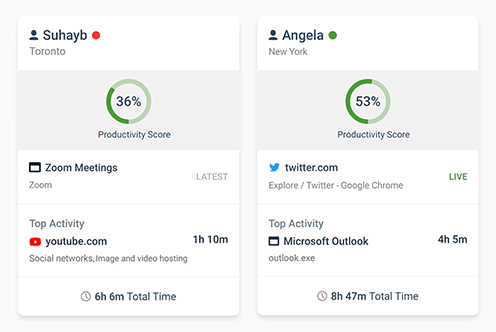
BrowseReporter’s detailed employee productivity reports make tracking productivity simple and intuitive.
Equip managers with the activity data they need to understand how in-house and remote team members are spending their time at work.
- Find out if employees are wasting work time on social media, computer games, and other distractions
- Track the productivity levels of your entire workforce, a specific team, and individual employees
- Compare productivity between time spent in-office vs working remotely to provide flexibility while maintaining accountability


Track Login & Logout Times
Combine idle time tracking with logon history reports to get a full picture of your employee’s activity levels.
- Audit logon and logoff times to see how long your employee’s are working at their computers
- Get a record of each time your employees startup, sleep, and shutdown their computers
- Verify that employees working from home are active during work hours and see when they are taking breaks
Get Insights Based on Employee Location
The Location Insights dashboard helps leaders make data-driven decisions about remote, in-office, and hybrid work.
Promote flexibility without sacrificing accountability with insights into how location flexibility affects employee engagement and productivity.
- Compare productivity scores between groups of in-office, remote, and hybrid employees to gauge the impact that location flexibility has on employee engagement
- See how much of your workforce is working in-office, remotely, or hybrid in a given timeframe
- Review productivity trends to decide if frequently abused distractions need to be limited with BrowseControl’s URL filter


Optimize Workforce Efficiency With Employee Utilization Rate
Get visibility into workload distribution and productivity through expected work hours to improve efficiency, reduce costs, and foster a healthier workforce.
- Optimize Resource Utilization – Ensure teams are neither overworked nor underutilized for better capacity planning.
- Boost Productivity & Cut Costs – Identify inefficiencies, streamline projects, and improve operations.
- Enhance Employee Well-Being – Detect burnout or disengagement early and take proactive action.

Among organizations that don’t restrict internet activity, 58% of employees spend the equivalent of 26 workdays per year on websites unrelated to their job 1
With CurrentWare’s internet activity monitoring and restriction tools you can prevent the abuse of distracting websites
Why Employers Monitor Employees 2
- Understand How Staff Spend Time 79%
- Ensure Staff Work a Full Day 65%
- Prevent Personal Use 50%
%
81% of companies that tried monitoring tools increased productivity ³
1 Spiceworks Study Reveals Employees Spend 26 Days Per Year on Websites Unrelated to Their Job. (2018). Spiceworks. Retrieved from https://www.spiceworks.com/press/releases/spiceworks-study-reveals-employees-spend-26-days-per-year-on-websites-unrelated-to-their-job/.
2 State of Hybrid Work 2023. Owl Labs. (2023). https://owllabs.com/state-of-hybrid-work/2023
3 60% of Employers Require Monitoring Software for WFH Workers. Digital. (2021). https://digital.com/6-in-10-employers-require-monitoring-software-for-remote-workers/