
4.8/5 on G2 Trusted by 100,000+ professionals in 55 countries
BrowseControl: Block Harmful & Distracting Websites Across Your Workforce
Powerful business web filtering and application blocking software.
- Boost Productivity
- Prevent Malware
- Enforce Compliance
*No credit card required · 14-day free trial · Easy setup
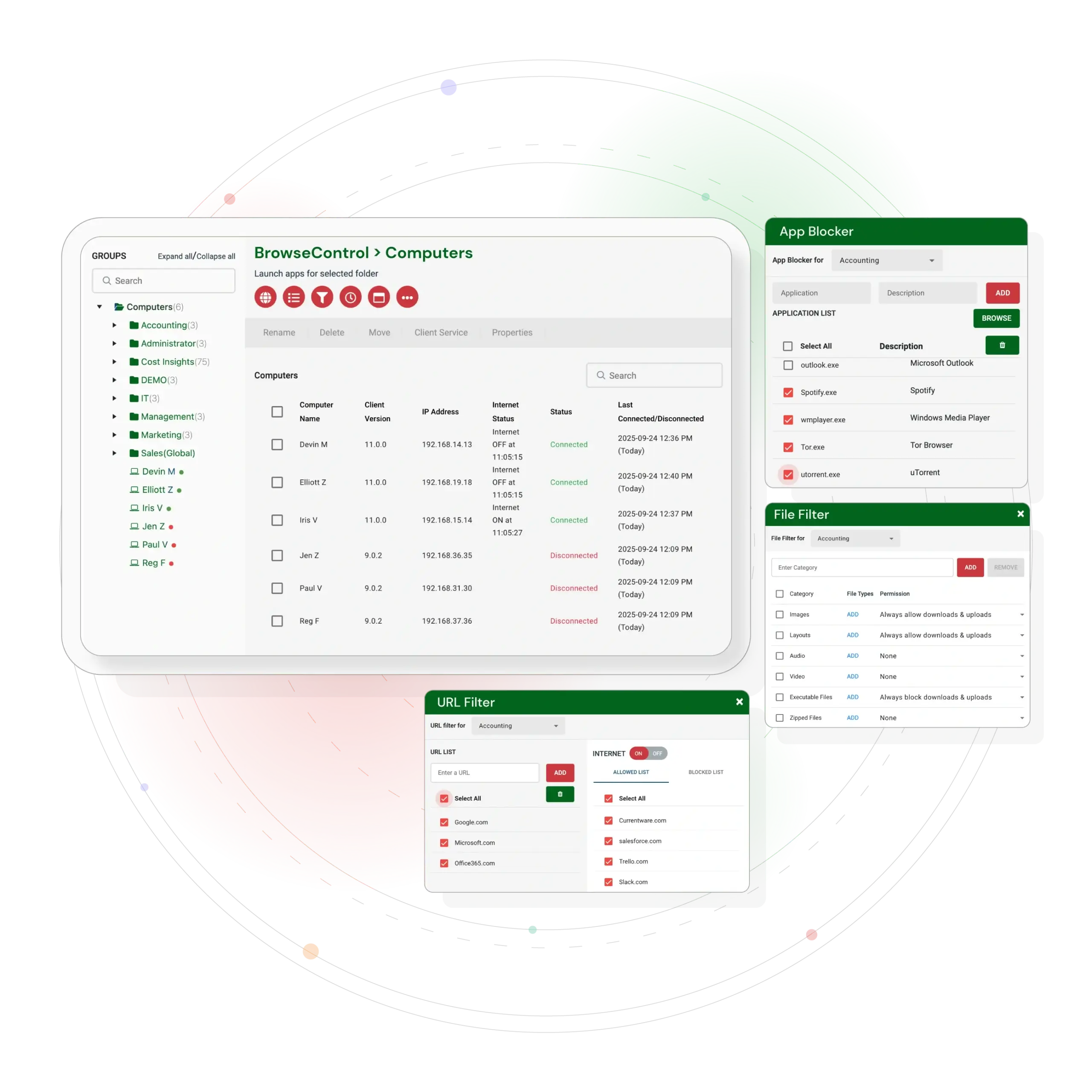
Trusted by local and state government agencies , healthcare organizations, professional services firms, and more.








Why Choose BrowseControl?
BrowseControl is a comprehensive web filtering solution from CurrentWare that gives businesses the power to control internet access and improve security.
Productivity & Security
BrowseControl helps you block distracting social media, streaming, and gaming sites. By preventing overblocking and ensuring employees have access to necessary resources, web filtering supports employee productivity.This boosts productivity and prevents malware and phishing attacks, keeping your company data safe. BrowseControl also provides malware protection by blocking access to malicious sites and web-based threats.
Flexible Policies
Easily create time based policies to control internet access for specific users, departments, or schedules.
Additionally, administrators can choose selected categories to block or allow, tailoring internet access to organizational needs.
Endpoint & Network-Wide Coverage
Our endpoint based solution ensures consistent protection and policy enforcement for all users, regardless of location.
Simple Management
Unlike complex, expensive competitors, BrowseControl is simple to manage with intuitive controls and centralized administration.
.
BrowseControl enables organizations to implement web security by restricting access to risky or distracting websites, helping to prevent malware infections, blocking the execution or download of malicious code, and enhancing productivity. Unlike complex, expensive competitors, BrowseControl is simple to manage and works everywhere your employees do.
Key Features
BrowseControl helps protect both individual devices and entire networks from web-based threats with comprehensive filtering and blocking capabilities.
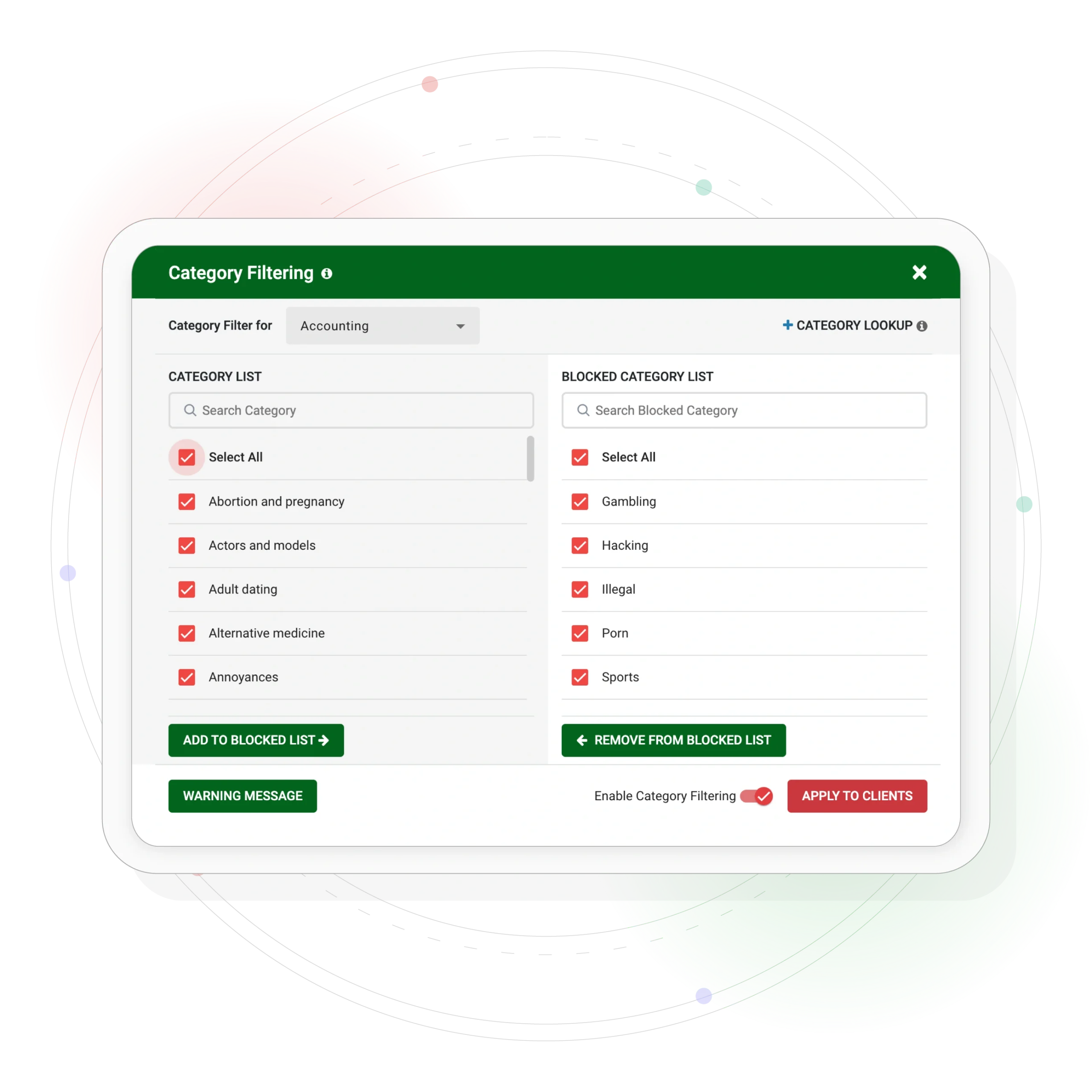
Take control with our category based filtering database that automatically updates daily to block sites by type, such as social media, streaming, and adult content.Content filters enable admins to block entire categories of websites, making it easy to enforce web usage policies.
URL Filtering & Allow Lists
Create custom allow lists to ensure employees can only access pre-approved websites, perfect for training environments and specific projects. URL filtering works by comparing web addresses against a database of permitted and blocked sites to enforce security policies and prevent access to unsafe or inappropriate content.
Application Blocking & Blacklisting
Prevent employees from using unproductive or unsafe applications like messaging apps and file-sharing tools. Simply blacklist any unwanted program. BrowseControl can also restrict access to certain web applications, depending on organizational requirements.
Schedule when users have internet access. This feature is ideal for controlling internet usage during specific hours, training sessions, or class time.
File & Bandwidth Control
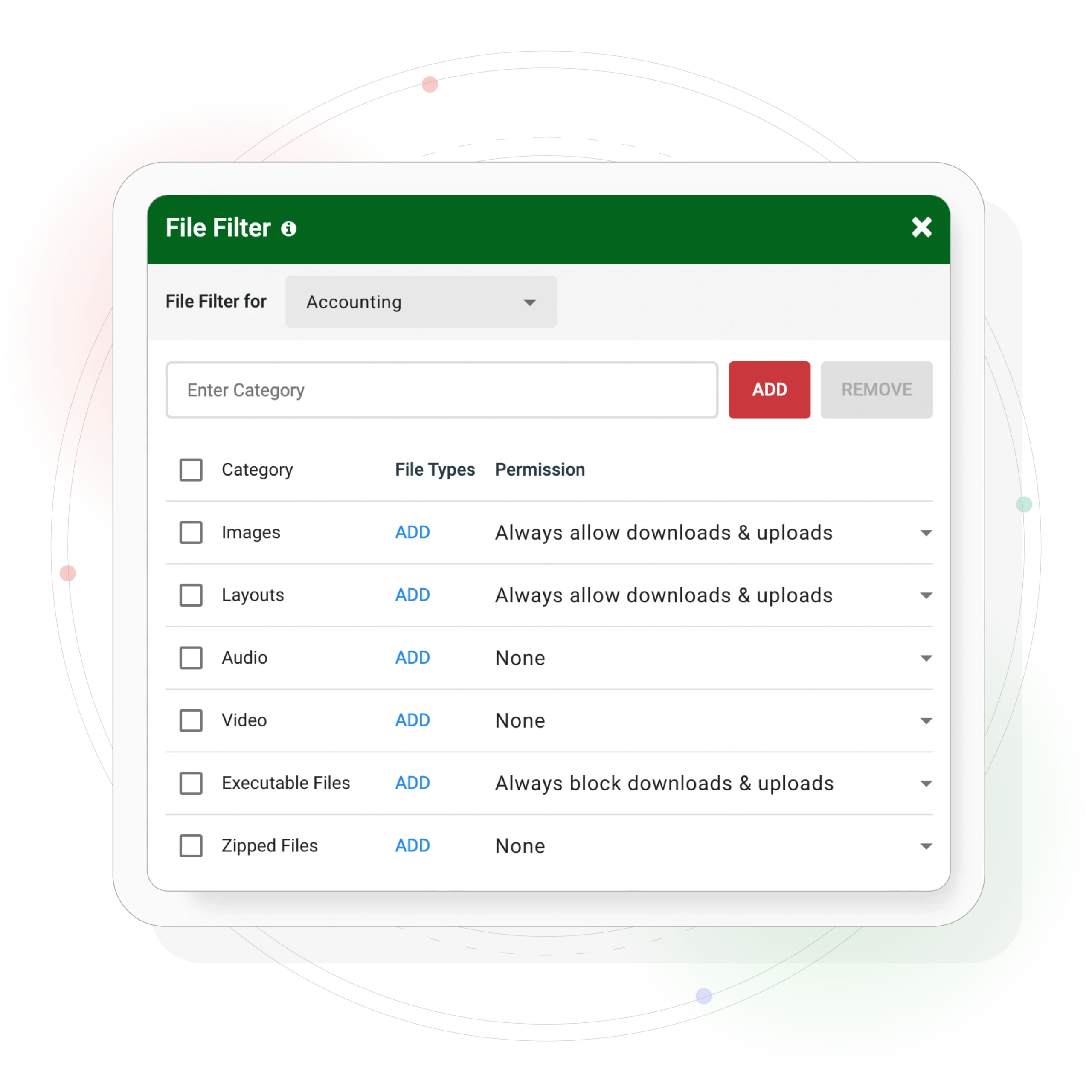
Prevent data leaks and conserve network resources by blocking file uploads and downloads. Controlling file transfers and downloads helps manage bandwidth usage and optimize network bandwidth.
Custom Warning Message
Displays a blocked website message when users attempt to access blocked websites. Display a message or redirect users to another web page.Remind your users of your acceptable use policy
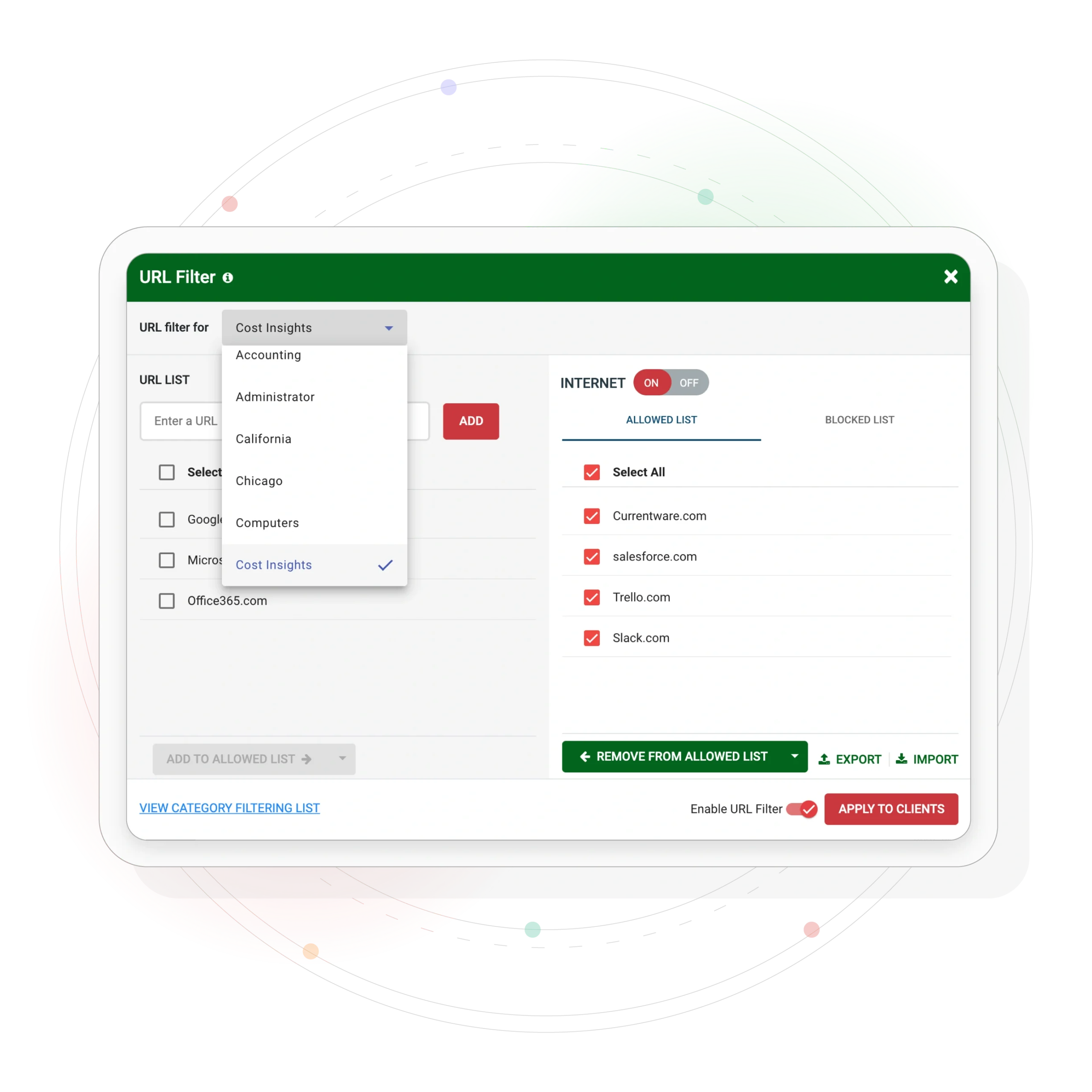
Restrict Employee Internet Access Based On Users or PCs
Block access to any site by category, URL, domain, or IP address, allowing you to control or block specific sites and filter by IP addresses for enhanced security
Customize internet restrictions for each user, device, or department
Schedule unique internet restrictions throughout the day or on weekends
Block High-Risk & Inappropriate Websites in Just a Few Clicks
Block websites based on content categories with Browse Control’s website classification database
Easily block distracting sites with inappropriate content such as pornography. The filtering database includes known sites associated with malware or security threats.
More than 10,000 new domains are added each day, making it simple for businesses to block websites even as new sites emerge. Users receive a block notification when attempting to access restricted content.
Protect Sensitive Data & Systems by Blocking File Uploads/Downloads
Combine BrowseControl’s file filter with the rest of the data loss prevention features in the CurrentWare Suite
Block specific file types from being uploaded or downloaded. Web filtering also helps protect sensitive information, such as login credentials, from being stolen by malicious sites designed to deliver malware.
Improve bandwidth availability by preventing users from downloading unnecessary files
Why is Internet Filtering Important?
Create a Safe Online Environment
Control access to websites and online content to ensure employees only see appropriate and secure material.
Protect Against Cyber Threats
Block malware, phishing, scams, and other online risks to safeguard corporate resources.
Ensure Compliance
Use web and internet filtering software to meet regulatory requirements and internal policies.
Maintain Productivity
Filter distracting sites to help employees stay focused on work-related tasks.
Gain Proactive Control
Filter distracting sites to help employees stay focused on work-related tasks.
Best Practices for Web Filtering Software
To maximize the effectiveness of your web content filtering software and internet filtering software, it’s important to follow best practices for managing internet access and content filtering
Productivity & Security
BrowseControl helps to configure network settings for optimal protection and install browser extensions to filter web content across all devices and browsers.
Policy Development
Establish clear internet usage policies that define acceptable use and outline consequences for policy violations.
Training and Awareness
Educate users about internet safety, the risks of accessing distracting or malicious content, and how to recognize phishing attempts.
Monitoring and Management
Regularly monitor internet activity using your filtering software’s reporting features to ensure compliance and quickly address any issues.
The IT team can leverage advanced features within your filtering solution and maintain full control over filtering policies, allowing them to customize settings and ensure that both security and productivity are balanced.
Implementing Filtering Policies
Effectively managing internet access starts with implementing robust filtering policies. Internet filtering software and internet filters allow you to set these policies at multiple levels, depending on your organization’s needs
Install internet filtering software directly on individual devices to control access regardless of the network they’re connected to. This is ideal for remote workers.
Configure your network settings to block or allow access to specific websites for all users connected to your network. This approach is perfect for businesses and schools that need to enforce consistent filtering policies across many devices. Some proxy sites can route traffic to bypass these restrictions, so robust filtering is essential to prevent access to unwanted or potentially harmful destinations
Use browser extensions or plugins to filter out unwanted content within specific browsers. This method is quick to deploy and easy to manage for smaller groups or specific use cases
Managing Block Lists with BrowseControl
Block lists are a powerful tool within web content filtering software and internet filtering software, allowing administrators to precisely control which websites, URLs, or domains users can access. Web filters can block or allow access based on domain names and selected categories, using database-driven criteria to regulate internet content. By creating and managing block lists, you can :
By creating and managing block lists, you can:
Block access to specific websites or entire categories to reduce distractions and boost productivity.
Customize block lists to address unique organizational needs, ensuring only authorized web content is available.
With intuitive management features, you can easily update block lists as new threats emerge or as your organization’s needs change. This proactive approach to content filtering ensures that users access only safe, relevant, and approved websites, keeping your environment secure and compliant
PROVEN RESULTS
Real Results & Validation
BrowseControl is trusted by businesses worldwide to improve productivity and compliance.

CASE STUDY
Shady Maple Transforms Their Productivity With Internet Filtering
Employee Focus
Near 100% productivity during work hours
Efficiency Gains
Became extremely efficient workforce
Quick Response
Issues identified and stopped within hours
"Being able to identify negative browsing trends and put a stop to them within a couple of hours has meant that our employees are focused on the job almost all of the time. We have become an extremely efficient workforce."
Blogs


Websites That Can Steal Your Focus: Learn to Block Them for Better Productivity
February 10, 2026 8:04 AM

Mastering Internet Control: How to Block Specific Websites Effectively
February 10, 2026 7:12 AM

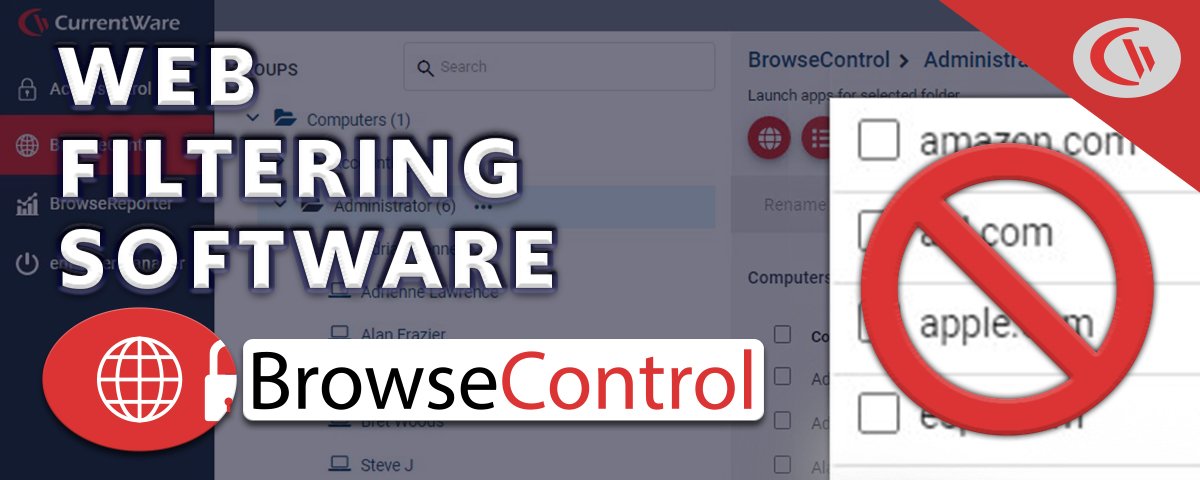
BrowseControl Web Content Filtering Software Overview (Video)
November 23, 2025 12:00 AM
How Employees Bypass Web Filters and How to Prevent It
November 1, 2025 1:00 AM
Your Questions, Answered
Web filtering software controls internet access by applying predefined usage policies across users, devices, and networks. Administrators define what’s allowed or restricted based on categories, URLs, roles, or devices. Once active, the system evaluates every web request in real time. If a site violates policy, it’s blocked instantly before content loads. Modern solutions go further: they log activity, generate reports, and flag risky behavior. With continuously updated threat intelligence and AI-driven categorization, they can identify new or unknown sites on the fly, keeping enforcement accurate even as the web constantly changes.
Yes, web filtering acts as a frontline defense against web-based threats. It blocks access to known malicious domains, phishing pages, and compromised websites using continuously updated threat intelligence. When a user clicks a suspicious link, access is stopped before any harmful payload loads. Advanced tools also analyze behavior in real time catching spoofed domains, redirects, and unusual patterns. While it’s not a replacement for full cybersecurity infrastructure, it significantly reduces exposure. In practice, it cuts off threats at the entry point before they become incidents.
Basic tools can be bypassed VPNs, proxies, or alternate browsers often slip through. But enterprise grade solutions are built to close those gaps. They enforce policies at the device level, block unauthorized VPNs, and include anti-tampering controls. Some even detect behavioral patterns that signal evasion attempts. Because enforcement happens beyond just the network layer, switching connections doesn’t break control. No system is completely foolproof but modern web filtering makes bypassing difficult, detectable, and far less effective.
In most cases, users won’t even notice it’s there. Modern web filtering tools use lightweight agents and optimized processing to make decisions instantly. Cloud assisted intelligence and caching reduce latency further, ensuring smooth browsing. Only blocked sites create friction by design. In fact, performance often improves. By cutting access to bandwidth-heavy or non-work sites, filtering frees up network resources for critical applications. Poorly configured systems can slow things down but well implemented solutions prioritize speed as much as security.
Absolutely and it’s become essential. Modern filtering works at the endpoint level, not just within office networks. That means policies follow the user whether they’re at home, traveling, or in the office. This eliminates reliance on traditional firewalls and ensures consistent enforcement everywhere. For distributed teams, it provides the same visibility, control, and protection without disrupting flexibility. That consistency is what makes it a core part of modern workforce management.
Web filtering strengthens compliance by controlling internet usage and creating verifiable audit trails. It restricts access to high risk or inappropriate sites, reducing exposure to data breaches and regulatory violations. At the same time, activity logs provide evidence during audits. For frameworks like HIPAA, GDPR, or ISO 27001, it supports data protection by limiting unsafe interactions online. It’s not a complete compliance solution but it plays a critical supporting role in governance, risk reduction, and policy enforcement.
Yes. Policies can be tailored by role, department, device, or location. Marketing teams might access social media freely, while finance teams operate under stricter controls. Admins can define rules by categories, specific URLs, or even risk levels. Advanced setups allow granular control like restricting downloads or allowing access only during certain hours. This flexibility ensures security without blocking productivity and adapts as business needs evolve.
Yes. Admins can define when certain sites or categories are accessible. For example, social media might be blocked during work hours but allowed during breaks. This approach balances control with flexibility, reducing distractions without creating unnecessary friction. Time based rules can be applied across users, groups, or the entire organization, making them ideal for dynamic work environments with varying schedules.
Not anymore. Modern solutions like BrowseControl by CurrentWare are built for fast, low friction deployment. Lightweight agents can be rolled out across devices, often silently or remotely. Integration with directory systems like Active Directory simplifies user management. Once deployed, policies are managed centrally and updated in real time. Initial setup requires planning but ongoing management is straightforward. For most organizations, deployment is quick, scalable, and far from disruptive.
Yes. By limiting access to distracting sites, employees naturally spend more time on meaningful work. But the real advantage is visibility. Organizations can identify patterns, spot inefficiencies, and improve workflows based on actual behavior. The goal isn’t restriction, it’s alignment. Giving employees access to what they need while reducing what pulls them away. Over time, this leads to more consistent output and better performance across teams.
Absolutely. Web filtering allows both precise and broad control. You can block individual websites like streaming platforms or entire categories such as gambling, adult content, or social media. These categories are powered by constantly updated databases that classify millions of sites automatically. Admins can also create exceptions allowing specific sites within blocked categories. The result: strong enforcement without sacrificing legitimate business access.
It helps reduce risk. Web filtering prevents access to risky sites, blocks uploads to unauthorized platforms, and limits interaction with unsafe environments. This reduces the chances of accidental or intentional data exposure. Combined with monitoring and logging, it also provides visibility into how data moves through web channels helping organizations respond faster to potential threats. Think of it as a strong first layer in a broader data protection strategy.
Yes. Different teams have different needs. HR may require access to job portals, while finance teams may need tighter restrictions. Web filtering allows policies to be applied at the department level using user groups or organizational units. This ensures employees get the access they need without exposing the entire organization to unnecessary risk. Targeted control leads to better security and better productivity.
Constantly. Modern web filtering relies on real-time threat intelligence, machine learning, and automated classification. Updates can happen multiple times a day or continuously. This ensures new malicious domains and emerging threats are blocked almost immediately. Without frequent updates, filtering becomes outdated quickly. With them, it stays accurate, relevant, and effective against both known and unknown risks.
Yes, web filtering is scalable for growing organizations. Whether you’re managing 50 users or 5,000, modern web filtering platforms scale without compromising performance. Cloud based architectures allow easy expansion, while centralized management ensures consistent policy enforcement across all users and locations. New users can be added quickly, and policies adjusted without major infrastructure changes.
Try BrowseControl Today
Get started with an affordable per-user pricing model and volume discounts. Protect your business and boost productivity today.
No Credit Card Required
Join thousands of businesses using BrowseControl to enhance security and productivity